FAX - Send Fax from Phone
- 4.4
- Rating
- 500.00K
- Installs
- Free
- Price
 Analysis by App-foxy
When a document suddenly needs to be faxed, the problem is rarely the document itself. The problem is finding a machine, a phone line, paper, and enough time to deal with all of them. FAX - Send Fax from Phone takes a much simpler approach: it turns an Android phone into a practical place to send and receive faxes online. After using it as a business utility, I see it as a useful emergency tool rather than a complete replacement for every document workflow.
My main recommendation is straightforward: if you occasionally deal with offices, forms, invoices, medical paperwork, or other organizations that still ask for a fax, this app is worth keeping available. It is free to install, aimed at Everyone, and developed by Dingtone Phone. Its average score of 4.4 from around 4.5 thousand ratings suggests that many users find the basic idea worthwhile. The experience is most convincing when speed and convenience matter more than advanced document management.
What using the fax app feels like in practice
I find the app most useful when a fax request arrives unexpectedly and I need to decide whether my phone is enough or whether I should use a more structured service. In this section, I’ll focus on the practical choices that shape that decision, including document preparation and the trade-off between quick access and a more controlled workflow.
You May Also Like

 Blood Strike: 2.5 Anniversary
Blood Strike’s Loadouts Turn Every Drop Into a Tactical Gamble
A close look at Blood Strike’s custom loadouts: how fast access to signature weapons reshapes its battle royale rhythm, rewards preparation, and narrows the gap between fights.

 Pandora - Music & Podcasts
Pandora’s Music Is Easy to Start, but Harder to Recover
Pandora’s strength is its low-effort path from a seed to a station. Its weak spot is how much confidence it asks you to place in connection, setup, and quiet recovery.

 8 Ball Pool
8 Ball Pool Is Built on Rivalries, Rematches, and Routine
A close look at the rivalries, rematches, shared routines, and unanswered safety questions that turn a quick pool match into a persistent mobile community.

 Samsung Music
Samsung Music’s Quiet Strength Is Playing What You Already Own
Its reach comes less from spectacle than from dependable access to a personal library. That simplicity is both the app’s strongest retention engine and its ceiling.

 AccuWeather: Weather Radar
AccuWeather Review: A Quick, Clear Forecast for Everyday Decisions
For everyday plans, the best forecast is the one you can understand quickly. AccuWeather makes rain timing, radar, and local conditions easy to act on, with a few trade-offs.

 Hill Climb Racing
Why Hill Climb Racing Still Turns Crashes Into One More Run
A tiny car, a bumpy hill and one more upgrade: Hill Climb Racing keeps resurfacing because its simple chaos makes every near-miss feel personal.
More From Our News Desk



A useful answer to an old-fashioned requirement
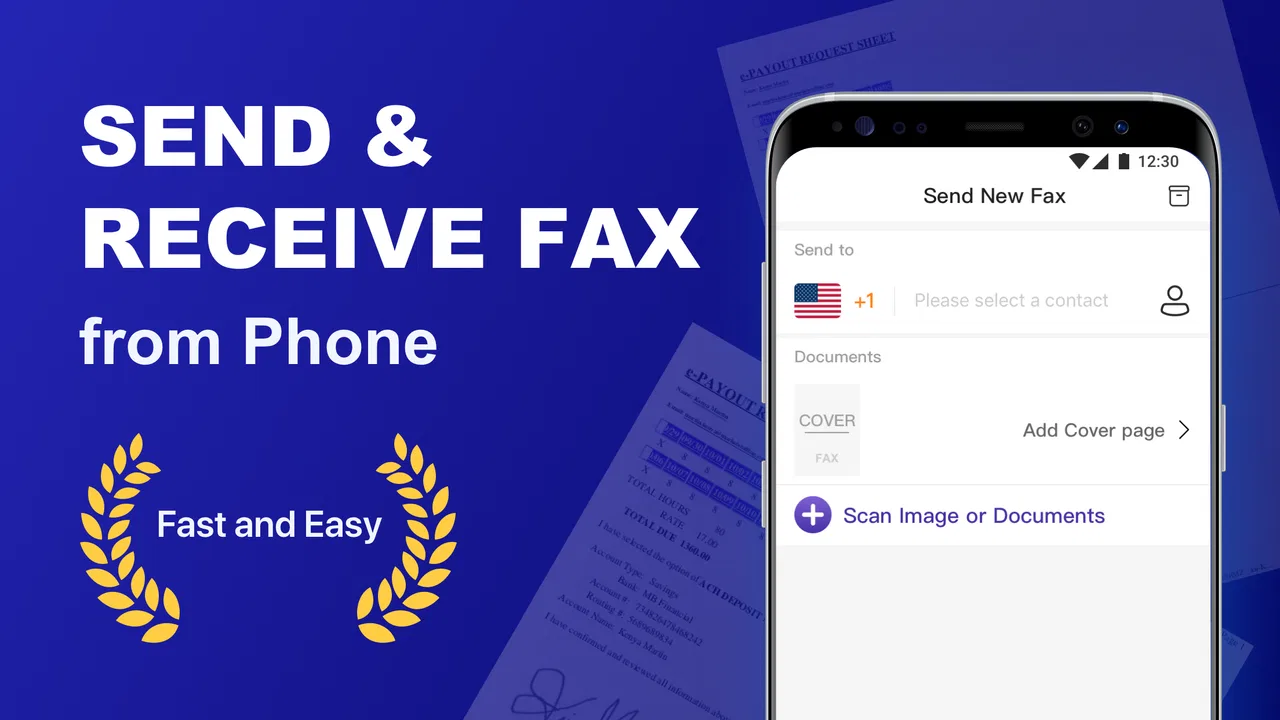
The strongest part of FAX - Send Fax from Phone is that it addresses a very specific nuisance without asking me to maintain dedicated equipment. I can work from an Android device running at least Android 7.0, prepare the document on the phone, and handle the faxing task from the same place. That is especially helpful when I am away from an office or when a recipient insists on fax instead of accepting email.
This is not an app I would open for general communication. It has a narrower purpose, and that is a strength. The interface does not need to compete with messaging, cloud storage, or video calls. Its value comes from reducing the number of steps between having a document on my phone and sending it to a fax destination.
A realistic example is a small business owner who receives a signed form as a phone scan while visiting a client. Instead of returning to the office, searching for a fax machine, or asking someone else to send it, the owner can use the app to move the document along immediately. The same logic applies to a tenant sending paperwork to a property manager, a freelancer submitting an administrative form, or a family member dealing with an organization that has not moved fully to digital communication.
Where it fits among familiar alternatives
Compared with a physical fax machine, the app is far easier for occasional use. There is no hardware to store, no paper supply to manage, and no need to be in a particular room. Compared with emailing a PDF, however, it only makes sense when the recipient specifically requires fax or treats it as the preferred channel. Email remains more convenient for ordinary document sharing because it is familiar, searchable, and usually easier for back-and-forth communication.
Online fax services accessed through a browser can be a better choice for a company that sends documents constantly or needs a broader administrative system. A dedicated service may suit teams that require shared access, organized records, or a more formal workflow. FAX - Send Fax from Phone feels better suited to an individual who wants the capability close at hand without committing to office equipment.
I also would not treat it as a document editor. My preferred workflow is to prepare the file before opening the fax app. I check that every page is readable, rotate pages correctly, remove accidental blank pages, and make sure signatures or small print are visible. That preparation matters more than people expect: sending a poor scan from a phone can create delays even when the fax transmission itself works properly.
The practical workflow I would recommend
For the smoothest experience, I first gather the documents in one place on my phone. I use a clear scan rather than a casual photograph, especially when the recipient needs to read dates, account details, or handwritten information. I then review the page order and file name before sending. This small pause prevents a common mistake: transmitting the right pages in the wrong sequence.
Another useful habit is keeping the original document available until the recipient has confirmed receipt. A fax task can feel finished as soon as the send action is complete, but the real goal is that the other side receives a usable copy. If a clinic, government office, insurer, or business is waiting for the document, I would contact them afterward rather than assuming that transmission alone settled the matter.
For repeated work, I would create a simple phone folder for outgoing documents and another for confirmations or related correspondence. The app is valuable as the sending tool, but it should not be the only place where I organize important paperwork. That separation makes it easier to resend a page, answer a question, or prove which version was used.
Costs and the trade-off behind “free”
The app is free to download, which makes it easy to try before deciding whether it belongs in a regular workflow. It also includes in-app purchases ranging from $3.99 to $99.99 per item. That pricing range is important because occasional users should think about the total cost of the faxing they actually need, not just the initial download.
For a single urgent document, paying for a convenient mobile solution may be reasonable. For frequent faxing, the economics deserve closer attention. A user who sends documents every week may find that repeated purchases become less attractive than a dedicated plan or an established business fax service. I would test the app with a low-stakes document first and understand the available purchase choices before relying on it for a time-sensitive submission.
This is also where expectations need to stay realistic. “Free” describes access to the app, not necessarily unlimited faxing. Anyone comparing it with a physical machine, an office service, or a browser-based provider should compare the complete workflow and recurring costs. The right choice depends on how often I fax, how important the documents are, and whether I need a personal tool or a shared business system.
Receiving faxes changes the usefulness
The ability to send and receive faxes online makes the app more useful than a one-direction emergency sender. Sending is usually the immediate need, but receiving matters when an office, supplier, or institution sends paperwork back through fax. Having both directions available can reduce the temptation to maintain a separate fax number or ask another person to monitor a machine.
Even so, I would plan around availability rather than assume that every incoming fax is equally convenient to handle. If a document is confidential, I would pay attention to who can access the phone and where the received file is stored. A shared device, an unlocked screen, or a cluttered downloads area can create a privacy problem independent of the fax technology itself.
My practical advice is to decide in advance how incoming documents will be named, reviewed, and moved into long-term storage. A fax app can bring the file to the phone, but it does not replace a sensible filing routine. For business users, that distinction is important: sending and receiving are only the middle of the process, not the whole records system.
Meaningful limitations to consider
The biggest limitation is the app’s narrow dependence on fax as a communication method. If the recipient accepts email, a secure upload portal, or a shared cloud folder, those options may be quicker and easier to track. I would not choose this app simply because it can transmit documents; I would choose it because the other party genuinely needs a fax.
The second limitation is the phone-based nature of the workflow. A mobile screen is convenient, but it is not always the best place to inspect a long contract, compare multiple pages, or correct a complicated document. Before sending anything important, I prefer to review the file on a larger screen when possible, then use the phone for the final transmission rather than for every editing task.
There is also a reliability question whenever a deadline is involved. A mobile fax depends on having a working phone, a suitable connection, and a document that is already prepared correctly. That does not make the app unsuitable, but it means I would avoid waiting until the last minute for a legal, medical, financial, or employment document. A backup method remains sensible when a missed transmission could have serious consequences.
Users who need a full office workflow may also outgrow it. Teams often need shared queues, centralized records, permissions, and consistent billing. I would look elsewhere if several employees must send and receive documents under one organized process. This app is more convincing for personal use, independent work, and small-scale situations where one person controls the phone and the paperwork.
Who should install it
I think FAX - Send Fax from Phone is a good fit for people who fax occasionally but cannot justify a machine. It is also useful for mobile professionals who handle documents away from a desk, students dealing with administrative offices, caregivers managing paperwork for relatives, and small operators who need a quick way to respond to fax-only organizations.
It makes particular sense as a backup utility. I may not use it every day, but having a fax option ready can save a trip when an unexpected form appears. Since it is free to install and rated for Everyone, it is approachable for a broad range of users, provided they are comfortable checking purchase details before sending a large number of documents.
I would skip it if I never encounter fax requirements, if my work involves heavy document collaboration, or if I need a formal company-wide archive. I would also choose another solution when the recipient offers a secure online portal and the paperwork is sensitive or complex. In those situations, a purpose-built document platform may provide clearer organization and better control.
What the current release tells me
The current version is 1.4.6, and the app has been available since July 30, 2020. That gives it a meaningful history as a focused utility rather than a brand-new experiment. It has passed half a million installs, which also indicates that the mobile fax use case is not limited to a tiny group of people.
I would still judge it by the task in front of me instead of by adoption alone. A large user base does not guarantee that it matches every business process, and a good rating does not remove the need to inspect scans or confirm receipt. The figures make the app easier to take seriously, but my decision would remain based on frequency, document sensitivity, and the recipient’s requirements.
My verdict after weighing convenience against control
FAX - Send Fax from Phone is best understood as a practical bridge between modern phones and organizations that still rely on fax. Its strongest quality is not a long list of extras; it is the convenience of sending or receiving fax documents without standing beside a traditional machine. For occasional, personal, or mobile use, that convenience can be genuinely valuable.
I recommend it to anyone who has a real fax requirement and wants a phone-based option ready for the next unexpected form. I would approach it more cautiously for high-volume business work, sensitive records, or situations where a dedicated service offers better organization. Prepare documents carefully, keep your own copies, confirm receipt, and compare the in-app purchase cost with the alternatives you already have.
In my view, the app succeeds because it solves a narrow problem directly. It will not make faxing modern in every respect, and it should not replace good document handling. But when an office says “please fax this” and there is no machine nearby, having this tool on an Android phone can turn an awkward interruption into a manageable task.
FAQs for FAX - Send Fax from Phone
01What is FAX - Send Fax from Phone and how does it work?
FAX - Send Fax from Phone is a mobile faxing app designed to let you send documents directly from an Android or iOS device without using a traditional fax machine. After opening the app, you can import a file, scan pages with your phone’s camera, enter the recipient’s fax number, review the document, and submit it for transmission. The app generally provides a status update so you can check whether the fax was sent successfully or encountered an error.
02What types of documents can I send with FAX - Send Fax from Phone?
The app is intended for common business and personal documents, including PDFs, photos, scanned pages, forms, contracts, and identification paperwork. You can usually select files from your phone’s storage or cloud services, while the camera scanner can help convert physical pages into a digital document. Before sending, check the preview carefully because blurry images, cut-off edges, upside-down pages, or very large files may affect readability and transmission.
03Does FAX - Send Fax from Phone require payment or offer free faxes?
Faxing from a mobile device commonly involves credits, subscriptions, or in-app purchases, and the exact cost may depend on the destination, number of pages, and available plan. Some users may receive a limited trial or promotional option, but free sending should not be assumed. Review the app’s current pricing, credit requirements, renewal terms, and cancellation instructions in the store listing before submitting an important fax.
04Is FAX - Send Fax from Phone safe for confidential documents?
The app may be useful for sending sensitive paperwork, but users should still review its privacy policy and permissions before uploading personal, medical, financial, or legal documents. Confirm how files are transmitted, stored, and deleted, and avoid using unsecured public Wi-Fi when possible. It is also wise to verify the recipient’s fax number carefully, since a wrong number could expose confidential information to someone else.
05Can I receive faxes with FAX - Send Fax from Phone, or only send them?
FAX - Send Fax from Phone is primarily focused on sending faxes from a smartphone, so users should not automatically expect it to provide a permanent fax number or incoming fax mailbox. Receiving functionality, if available, may require a separate feature, account type, or paid plan. If you need two-way faxing, check the current app description and settings before downloading, because capabilities can differ between platforms and subscription levels.
Pros
- Send documents directly from your smartphone without a physical fax machine.
- Supports common file formats
- including PDFs and images.
- Useful for occasional faxing while traveling or working remotely.
- Offers a simple workflow suitable for users with little faxing experience.
- Delivery status helps confirm whether a fax was successfully transmitted.
Cons
- Fax credits or subscriptions may become expensive for frequent users.
- Scanned documents may require cropping or adjustment before sending.
- Transmission speed depends on your internet connection and document size.
- Sensitive files are handled through a third-party online fax service.
- Some destinations or international numbers may have additional restrictions.

FAX - Send Fax from Phone
Gallery